Kit · CLI
Safe agent spend from the terminal.
One command tree for login, middleware run binding, guardrail scaffolding, MCP setup, post-login status and control, diagnostics, and JSON automation. TypeScript and Python share the same flags, envelopes, and release contract.
No signup required
terminal
npx -p @paybond/kit paybond dev loop --offlineOffline Kit loop: authorize spend → execute tool → verify evidence. No account.
Ready for a hosted sandbox? Start free Sandbox · Agent middleware · Compare plans
First success in four steps
Staged path from offline rehearsal to a sandbox smoke. Copy each step; skip ahead only when you already have credentials.
- 1
Try offline
Rehearse authorize spend → execute tool → verify evidence with no API key.
Terminal
terminal
Terminal commandSwipe to inspect long linesnpx -p @paybond/kit paybond dev loop --offline - 2
Sandbox login
Authenticate with tenant-scoped sandbox credentials. Optional: paybond status to confirm auth, policy, and last smoke.
Terminal
terminal
Terminal commandSwipe to inspect long linespaybond login - 3
Scaffold a project
Generate policy, bootstrap, and smoke scripts you own.
Terminal
terminal
Terminal commandSwipe to inspect long linespaybond init --solution travel --framework generic --non-interactive - 4
Run smoke
Confirm the middleware path before wiring paid tools.
Terminal
terminal
Terminal commandSwipe to inspect long linesnpm run smoke
Install once, run anywhere
Zero-install with npx on Node, or pip when your agent runtime is already Python.
TypeScript (npx)
Terminal
terminal
Terminal commandSwipe to inspect long linesnpx -p @paybond/kit paybond --helpPython
Terminal
terminal
Terminal commandSwipe to inspect long linespip install paybond-kit && paybond --help
Core capabilities
Core CLI surfaces first. Advanced diagnostics and presets stay one scroll down.
Sandbox login
Authenticate once with tenant-scoped credentials before guardrail or MCP commands run.
Interactive project init
Scaffold policy, client bootstrap, framework stubs, .env.example, and npm run smoke from solution prompts.
Agent middleware CLI
Authorize runs, execute intercepted tool calls with automatic evidence, and reload policy on long-lived runs.
Local trace dashboard
paybond dev loop and paybond dev trace render the middleware timeline at http://127.0.0.1:9477.
MCP install and verify
Generate and verify host config for stdio paybond-mcp-server (paybond mcp install / verify-config). Remote hosts use Streamable HTTP at https://mcp.paybond.ai/mcp with Authorization: Bearer <paybond_sk_...>, or self-host with paybond mcp serve --transport http. Full setup lives in the Kit MCP server docs.
JSON automation
Stable machine-readable envelopes for scripts, CI, and coding agents.
Also available
Status snapshot
After login, paybond status summarizes auth, local policy, last smoke, and the local trace URL — use --format json for scripts.
Control plane
paybond control opens a read-mostly TUI over intents, receipts, policy, spend, and denials. For CI, paybond control --once --format json prints a snapshot and exits.
Sticky shell
paybond shell keeps gateway/env/profile context in a REPL; use --exec "status" (or any subcommand) in non-TTY and CI.
Console deep links
paybond open billing|sso|scim|compliance-exports (and intent/export/trace) is an escape hatch for rare admin tasks — not the day-to-day Kit path.
Audit exports
paybond audit exports create|list|get|verify|delete for compliance packs; open compliance-exports when you need the Console investigation UI.
One-command guardrails
Scaffold paid-tool guardrails with paybond-init presets for your framework and output path.
Strong completion presets
Catalog archetypes with pinned API versions — same IDs in CLI, policy templates, and console preview.
Vendor schema validation
Pre-check vendor JSON with paybond policy validate-evidence before evidence submit; doctor warns on scaffold drift.
Doctor and diagnostics
After login or init issues, run paybond doctor (and paybond doctor --agent with sandbox credentials) before agents hit production spend paths. For middleware timelines, use paybond dev trace.
TS and Python parity
Command tree, help text, and exit codes stay synchronized across both Kit packages.
Essential middleware commands
The happy path after quickstart: scaffold, one-shot smoke, authorize → execute → verify, then the local dashboard. After login, optional paybond status / paybond control --once --format json inspect sandbox state without replacing this path. Prefer a visual share-link? Open the hosted middleware trace replay. Full catalogs (including shell and open) live in the CLI contract.
Sandbox smoke
Sandbox smoke
terminal
paybond login
paybond init --solution travel --framework generic --non-interactive
npm run smoke| Command | Purpose |
|---|---|
| paybond init | Scaffold policy, bootstrap, and smoke scripts for your solution. |
| paybond agent sandbox smoke | End-to-end authorize → execute → verify in one sandbox invocation. |
| paybond agent run bind | Bootstrap or attach a run; persist .paybond/runs/<run_id>.json. |
| paybond agent tool execute | Authorize and execute an intercepted tool call with evidence. |
| paybond agent run trace | Inspect authorize → execute → verify → settle events for a run. |
| paybond dev trace | Open the local middleware timeline at http://127.0.0.1:9477. |
What the commands produce
Three surfaces a command string cannot show on its own: the local timeline the offline loop opens, the files init writes into your repo, and the envelope agents parse.
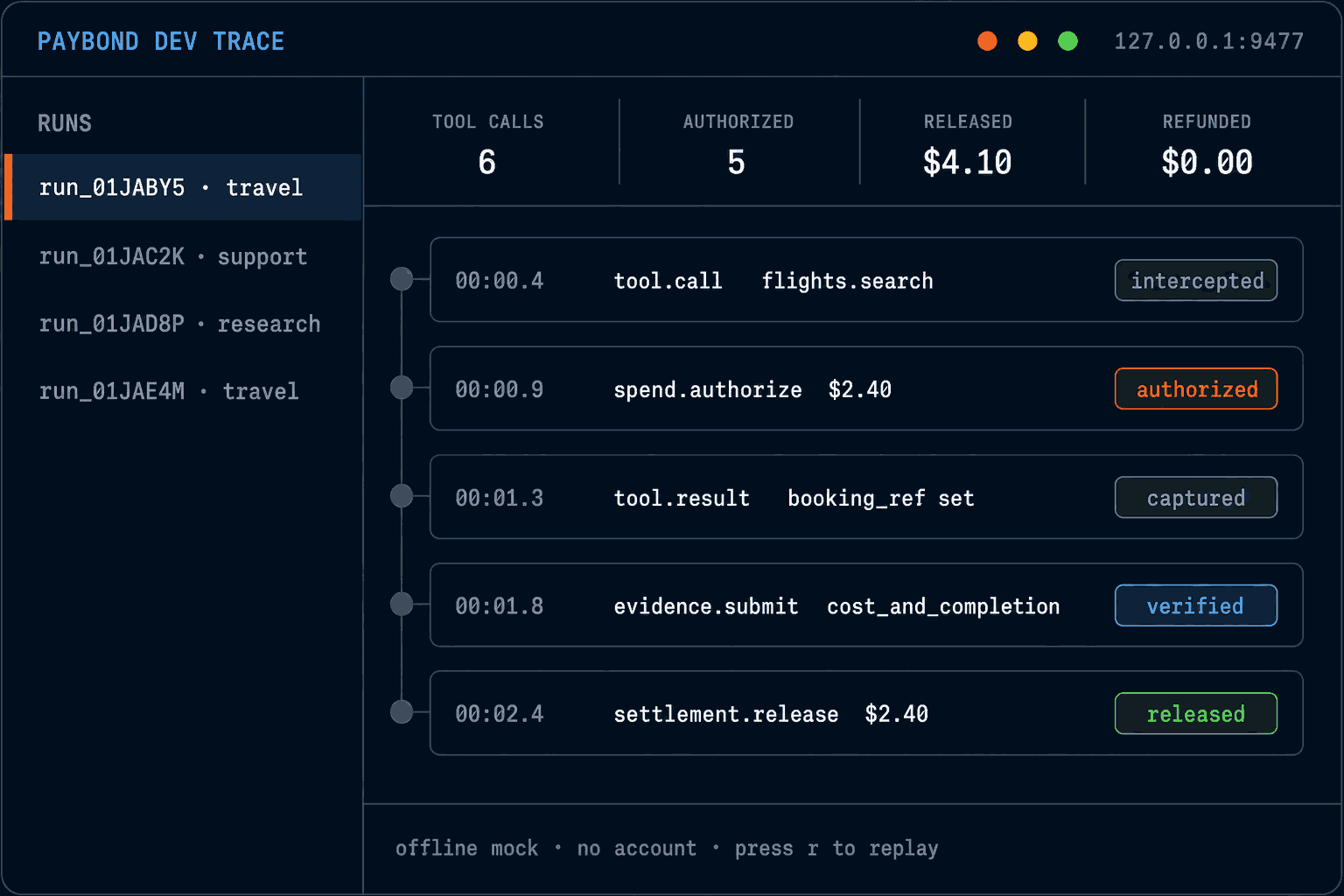
paybond dev traceEvery run renders as a local timeline at http://127.0.0.1:9477 — tool call, authorization, evidence check, release. No account, and nothing leaves the machine. 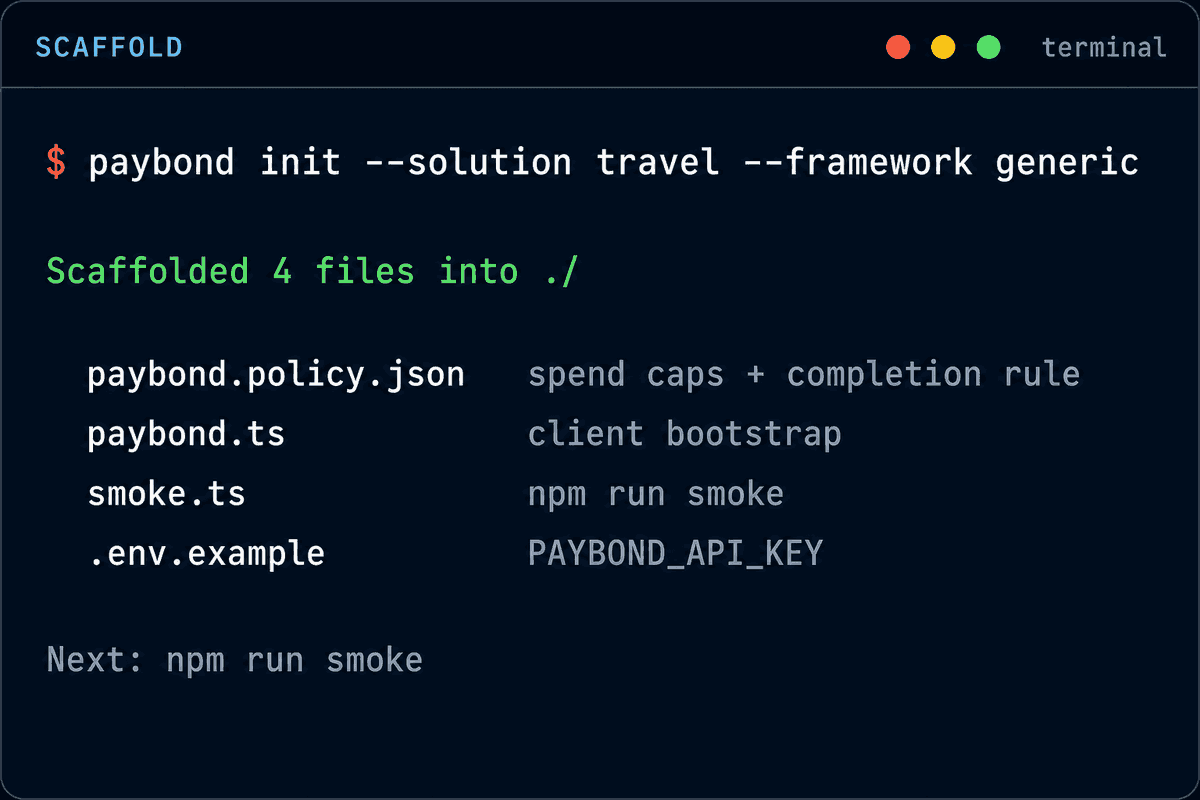
paybond initScaffolding writes real files you own — spend caps and a completion rule, a client bootstrap, a smoke script, and an env template. 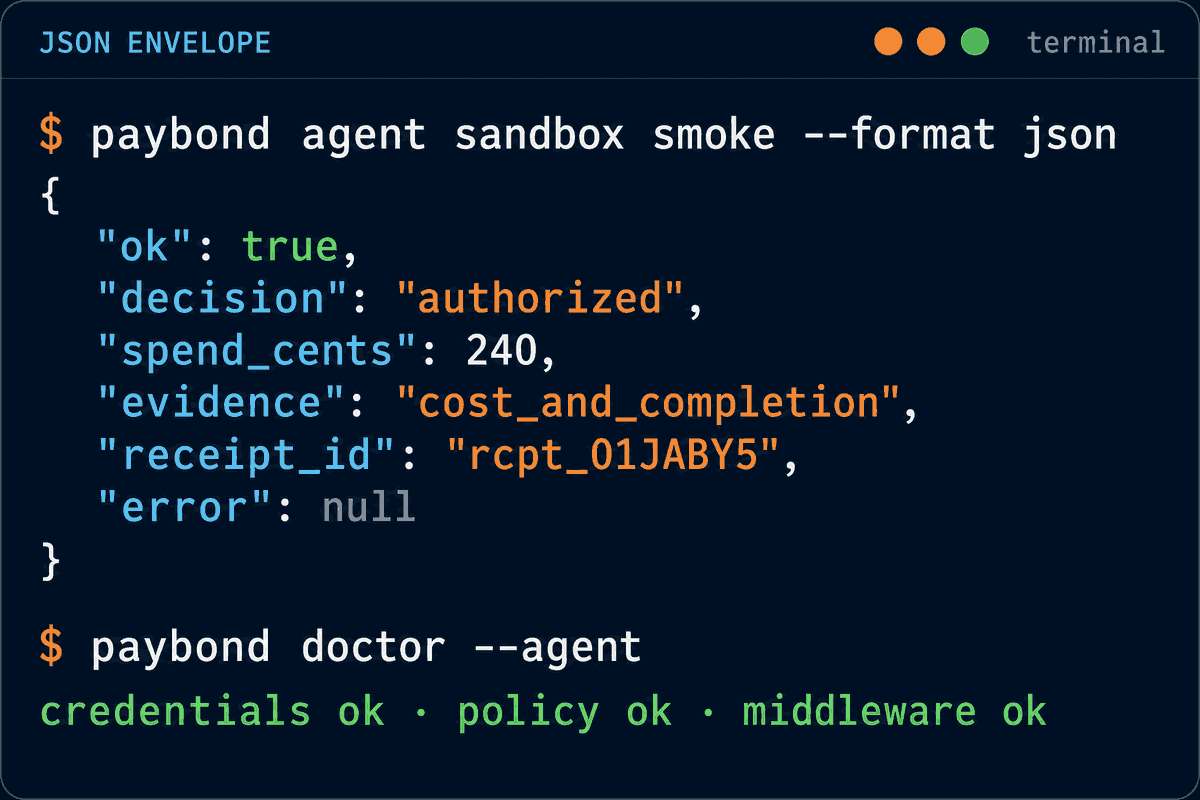
paybond agent sandbox smoke --format jsonEvery command has a JSON mode with a stable envelope — decision, spend, evidence preset, receipt id — so scripts, CI, and coding agents can branch on it.
Strong default completion rules
Shareable completion archetypes ship with the CLI. Spend guardrails authorize; proof-gated release when evidence matches the preset.
Catalog-aligned scaffolding
Run paybond init completion --preset api_response_ok to generate evidence helpers, sample payloads, and policy_binding stubs from the same JSON catalog the console uses.
Preview before you publish
List presets with paybond policy templates and evaluate sample evidence with paybond policy preview — strong defaults without raw predicate DSL.